Know What's Selling, Who's Slipping, and Who Orders Next: The New CrikSales Business Analytics Module
By Jason M. · Published · Updated · 5 min read
The CrikSales Business Analytics module is a set of three connected reports, Business Analysis, SKU Analysis, and Customer Analysis, that show you what is selling, what is not, and when each customer is likely to order again. Pick any custom date range and go from company-wide revenue down to a single item or customer in a few clicks.
Key takeaways
- Business Analysis: total revenue, revenue by rep, top 10 items, and top 10 customers for a custom date range, exportable to Excel.
- SKU Analysis: units, revenue, and the percentage of customers carrying each item, plus the customers who have never bought it.
- Customer Analysis: days since last order, average days between orders, and an estimated next order date for each item a customer buys.
- Built to act on: optimize inventory, improve customer retention, and boost profitability.
What is the CrikSales Business Analytics module?
It is a reporting module that answers the three questions every distributor, wholesaler, and manufacturer asks: How is the business doing? Which items are driving it? Which customers do I need to talk to this week? Each report is designed to let you take the pulse of your business at a glance, then dig into the detail when something looks off.
| Report | Question it answers | Best for |
|---|---|---|
| Business Analysis | How much did we make, and who and what drove it? | Sales managers, owners |
| SKU Analysis | What is selling, what is not, and who is missing out? | Product and purchasing managers |
| Customer Analysis | Who is slowing down, and when will they reorder? | Sales reps, account managers |
Business Analysis: your revenue at a glance
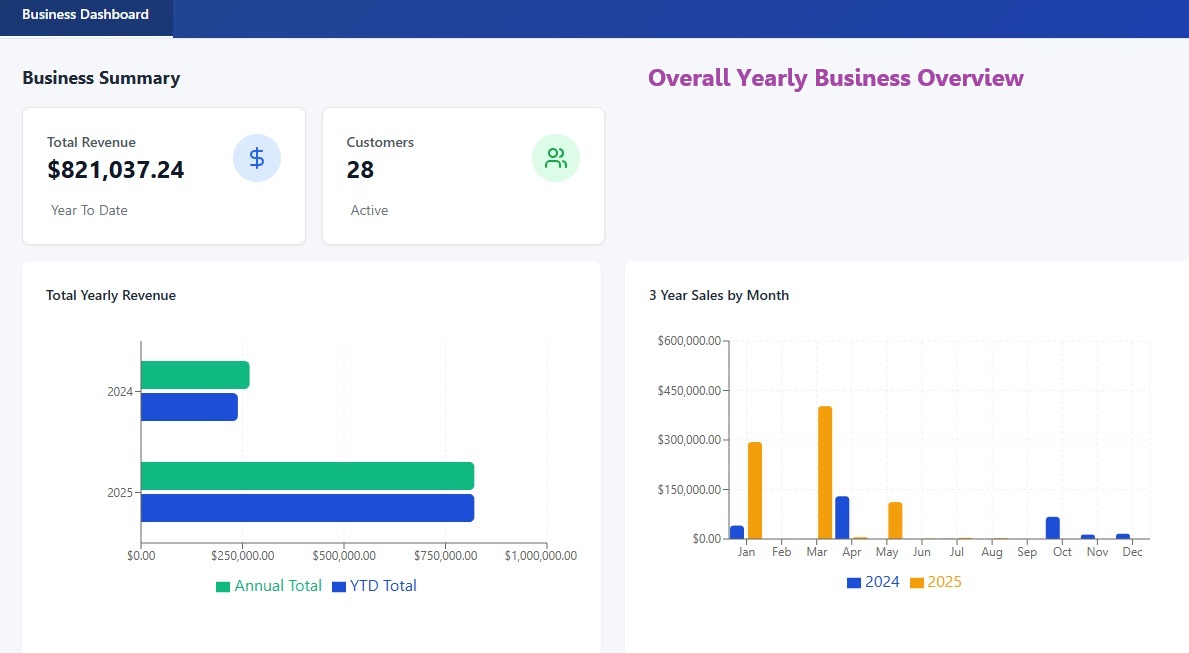
The Business Analysis report gives you a high-level view of total revenue, revenue broken down by rep, your top 10 items by revenue, and your top 10 customers by revenue for any custom date range. It is built for fast, data-driven decisions.
- Choose the chart format you prefer.
- Export the data to Excel.
- Click through from the Top 10 SKUs by Revenue graph to the SKU Analysis report.
- Click through from the Top 10 Customers by Revenue graph to the Customer Analysis report.
Watch: the Business Analytics module in action
This short video walks through all three reports.
SKU Analysis: see exactly what is selling, and what is not
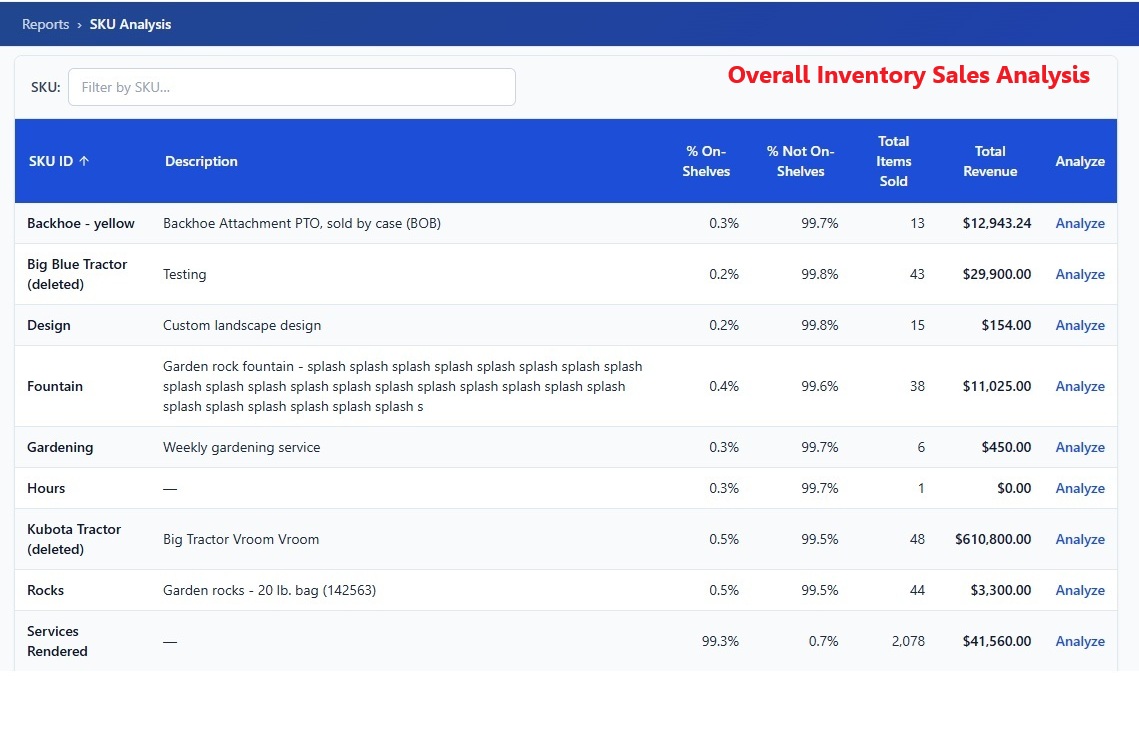
The SKU Analysis report shows total units sold, your top 10 items by revenue, and an in-depth look at every item in the SKU Performance Grid. You can quickly spot your top revenue drivers and your underperformers.
What the SKU Performance Grid shows
- The percentage of your customers that carry, or do not carry, each item.
- Units sold per item.
- Total revenue per item.
Drill into any item
- Who is buying it, and who is not.
- Units sold per customer.
- Monthly sales trends.
- Customers who have never purchased it. This is your shortlist of cross-sell opportunities.
With this view you can optimize inventory levels, forecast demand more accurately, and tailor your marketing to the customers most likely to buy.
Customer Analysis: your secret weapon for retention
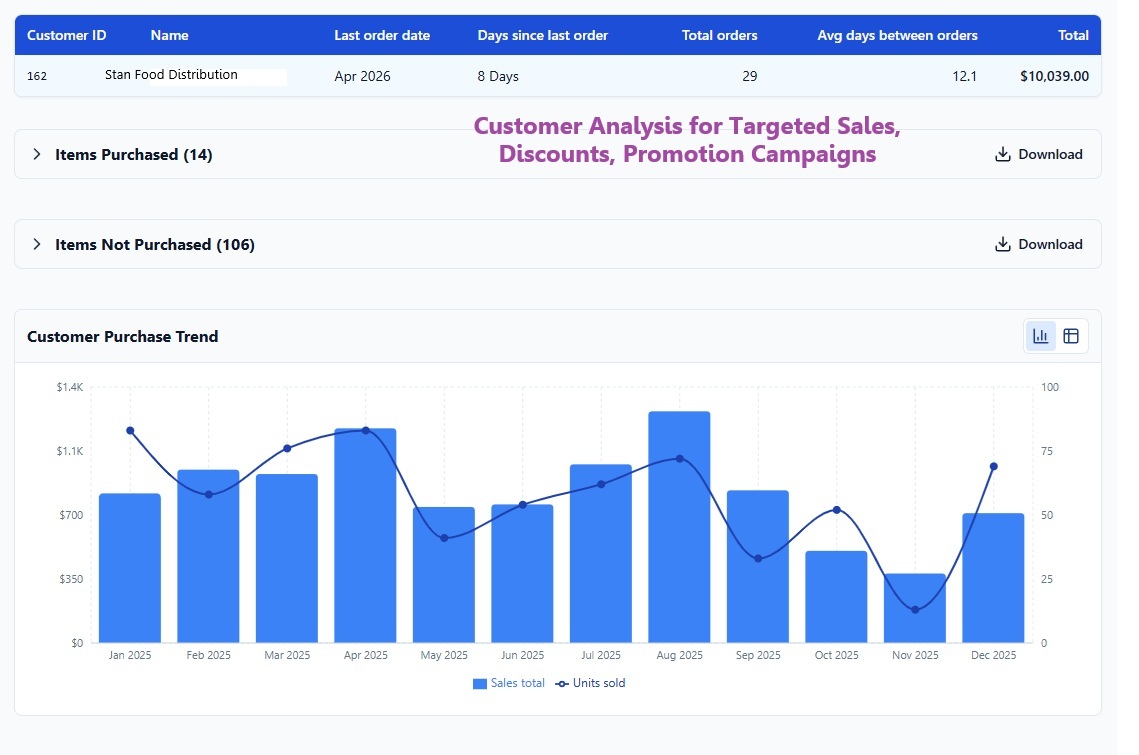
The Customer Analysis report helps you understand your customers like never before. By default it ranks customers by revenue, so you can focus on your high-value partners first.
What the Customers by Revenue grid shows
- The customer's last order date.
- The number of days since their last order.
- The total number of orders placed in the selected date range.
- The average number of days between orders.
Click Analyze to go deeper
Click Analyze on any customer to see:
- Items purchased: units of each item, total revenue, last order date, days since last order, reorder frequency for each item, and the estimated next order date.
- Items not purchased in the selected date range.
- Purchase trend for the selected date range.
That gives you in-depth insight into purchasing patterns and lets you anticipate each customer's next order from their sales trends, so you can reach out before they drift away.
How teams use the three reports together
- Start with Business Analysis to see which reps, items, and customers drove revenue in the period.
- Click the Top 10 SKUs graph to open SKU Analysis and find the items to stock up on, and the ones that are lagging.
- Click the Top 10 Customers graph to open Customer Analysis and see who is due to reorder, who has gone quiet, and which items they have never tried.
Flexible, easy-to-use reporting like this helps your business thrive, grow, and stay ahead of the curve. More walkthrough videos on the CrikSales reports are coming soon.
Frequently asked questions
What is the CrikSales Business Analytics module?
It is a set of three connected reports in CrikSales: Business Analysis, SKU Analysis, and Customer Analysis. Together they show total revenue, revenue by rep, top items and customers, what is and is not selling, and when each customer is likely to reorder, for any custom date range.
What does the Business Analysis report show?
A high-level view of total revenue, revenue by rep, the top 10 items by revenue, and the top 10 customers by revenue for a custom date range. You can choose the chart format and export the data to Excel.
How does the SKU Analysis report help me find underperforming items?
It shows total units sold, the top 10 items by revenue, and a SKU Performance Grid with the percentage of customers who carry each item, units sold, and revenue per item. Drilling into an item shows who is buying it, who is not, units sold per customer, monthly sales trends, and customers who have never purchased it.
How does CrikSales estimate when a customer will reorder?
The Customer Analysis report calculates each customer's average days between orders and, for each item they buy, the reorder frequency and an estimated next order date, based on their sales trends.
Can I see which items a customer has not purchased?
Yes. Click Analyze on any customer in the Customers by Revenue grid to see the items they have not purchased in the selected date range, alongside what they have bought, their last order date, and their purchase trend.
Can I export the reports?
Yes. The Business Analysis report can be exported to Excel.
Who is the Business Analytics module for?
Sales managers who track revenue by rep, product and purchasing managers who plan inventory and forecast demand, and sales reps who manage customer retention and follow-ups.
Want to see it in action?
We would love to demo these reports and show you how to turn your data into clear, actionable insights. Schedule a demo, or start your free trial. You can also explore CrikSales analytics, product analytics, and customer analytics.
For more articles like this, visit the CrikSales blog.
Related articles
Related features: Business intelligence · Business analytics