Sales Rep Commissions
Commissions that match how you actually sell
Set a different commission rate for each product and each type of customer, and see commissions only on invoices that have been paid.
Pay reps the way your business really works
Rates by product and customer type, set up from a spreadsheet, counted only when the money comes in.
A different rate for each product and customer type
- Set a separate rate for each product depending on who buys it, for example a distributor, retailer or contractor.
- Customer types come straight from QuickBooks, so customers don’t need to be tagged twice.
- If you use one flat rate per customer, keep doing that. The report switches to the right calculation for each business automatically.
Set up rates in a spreadsheet
- Download an Excel template that already lists every active product against every customer type. Fill in the rates and upload it.
- Preview every row before anything is saved.
- If any row has an error, nothing is saved, so you never end up with a half-updated rate table. You get a clear list of the rows to fix.
- View your current saved rates at any time, grouped by customer type.
Commissions on paid invoices only
- Commissions are counted by the date an invoice was paid, not the date it was sent, so reps are paid on money that has actually come in.
- When a credit memo can be traced to its original invoice, its commission is reversed at that invoice’s rate, so returns don’t distort payouts.
Filter it the way you need
- Filter by customer, by one or more reps, or by paid-date range.
- It opens on last month by default, which fits a monthly commission run.
The Commission Report
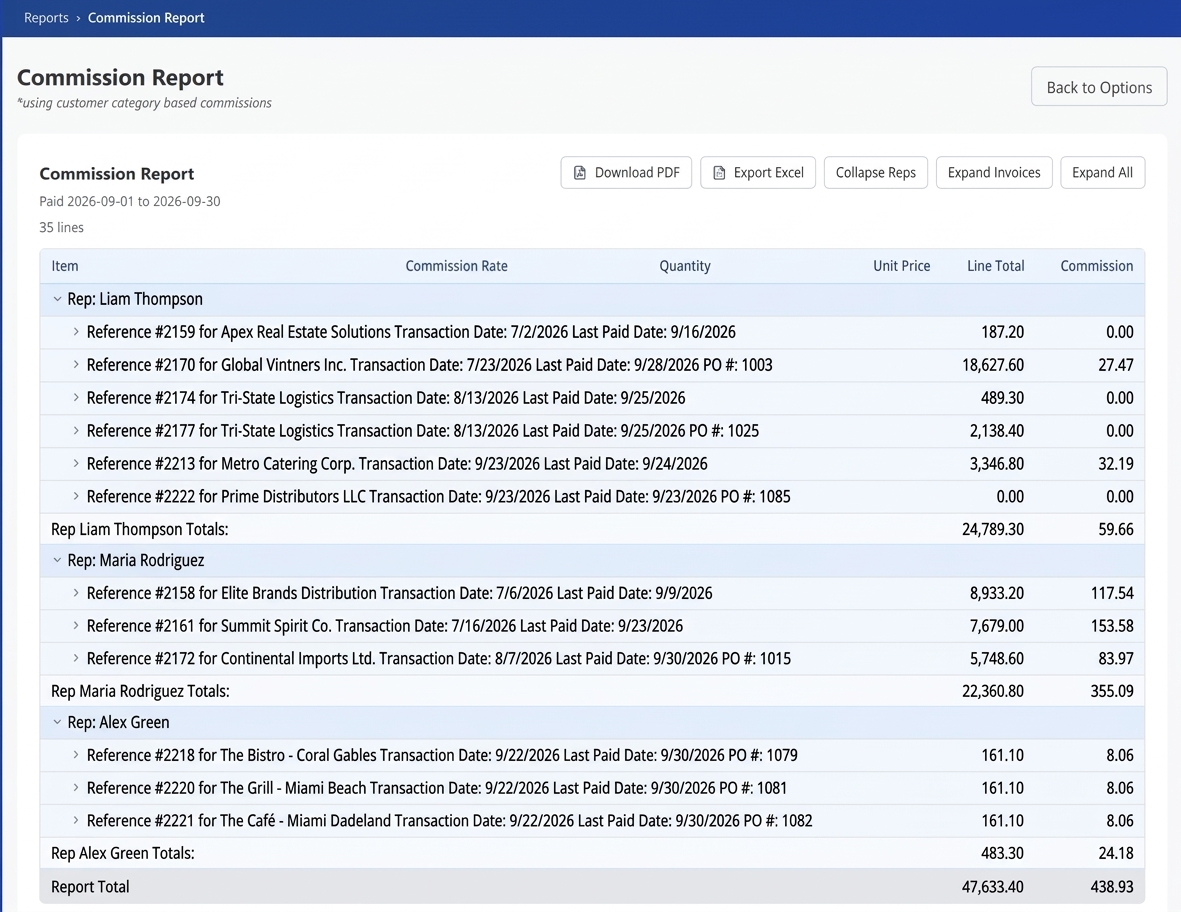
A clear report from rep down to each invoice line
Grouped by rep, then by invoice, then by line item, with subtotals at each level and a grand total.
Rep
Each rep’s total commission, so a monthly payout run is one glance.
Invoice
Each invoice heading shows the customer, PO number, transaction date and paid date.
Line item
Each line shows the SKU, commission rate, quantity, unit price, line total and commission.
Expand or collapse everything with one click, or open just the rep or invoice level.
Export with one click
Take the report wherever the numbers need to go.
PDF of what’s on screen
Download a PDF of exactly what you’re looking at, including which groups are expanded or collapsed.
Excel with subtotals
Export to Excel with subtotals included, ready for payroll or accounting.